Discord FAQ
Help with HECK schedule alerts, account connections, private messages, and Discord access.
iPhone & iPad access
How do I enable adult mode on Discord for iOS?
Discord calls this access to age-restricted servers. This setting controls what you can open in the Discord iOS app.
You can complete these steps on a desktop computer. You only need Safari's desktop-site mode if you choose to change the setting from an iPhone or iPad.
- On a desktop computer, open the Discord app or Discord Web in your browser. On an iPhone or iPad, open Discord Web in Safari. Sign in if prompted.
- If you are using Safari on an iPhone or iPad, tap the page menu in the address bar and select Request Desktop Website. Desktop computer users can skip this step.
-
In Discord, open User Settings using the gear icon.

Select the gear icon to open User Settings. - Under Messaging Permissions, select Content Filters. If Discord shows an older layout, look for the same controls under Privacy & Safety.
-
Turn on Allow access to age-restricted servers on iOS.
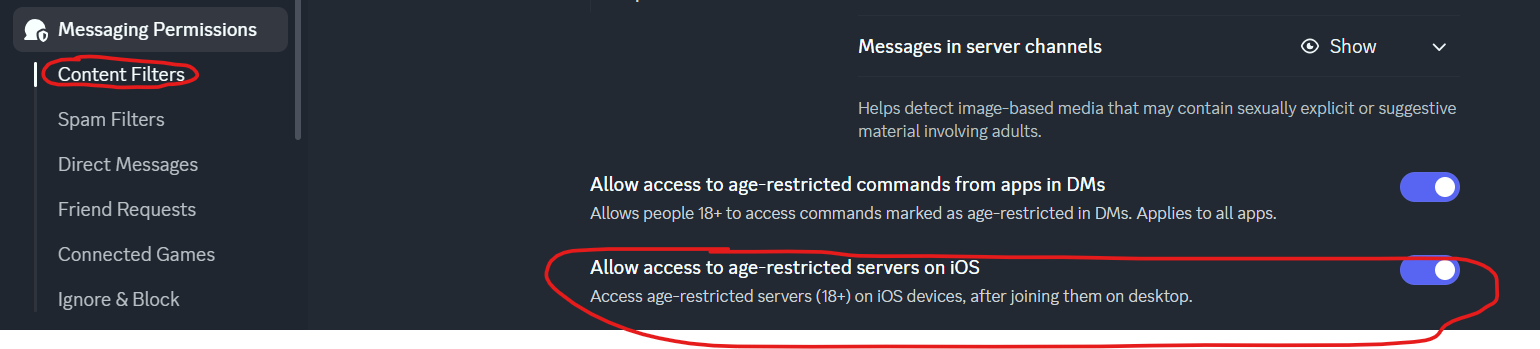
The toggle is in Messaging Permissions > Content Filters. - Close and reopen the Discord app on your iOS device if the change does not appear immediately.
HECK website & bot
Account and schedule alert questions
What does linking HECK and Discord do?
Signing into heckink.com with Discord lets the website confirm that you are a member of the HECK server. It then unlocks Notify me buttons across the public schedule.
Your selections are shared with the HECK bot, which can send private reminders before matching classes, events, or shifts. Signing in does not post anything publicly or give HECK your Discord password.
How do I subscribe to a schedule alert?
You have two options:
- On heckink.com, sign in with Discord and select Notify me beside a class, event, presenter, judge, volunteer, or Bootblack schedule.
- In Discord, type
/subscribeand choose the kind of alert you want.
The bot will confirm your choice. Website subscriptions also send a private confirmation message shortly afterward.
What can I receive schedule alerts for?
You can follow:
- One class, activity, or social event
- Every matching session from a presenter or judge
- A topic such as leather, consent, or rope
- A volunteer's regular and Bootblack shifts through the HECK website
You can follow as many classes, events, presenters, judges, and topics as you like. Volunteer alerts are limited to one selected person at a time.
When will the bot send my reminder?
The bot normally sends a private message shortly before the class, event, or shift begins. The current amount of advance notice is shown on the My Discord Alerts page.
Reminders are a convenience, so please continue to check the official HECK schedule for last-minute updates.
How do I see or remove my alerts?
Open My Discord Alerts from the Discord menu on heckink.com, or
type /subscriptions in Discord to see your current alerts.
Remove one with the matching /unsubscribe command or the Remove button
on the website. Use /unsubscribe all to stop every private schedule alert at once.
Why am I not receiving private messages from the bot?
Make sure you have not blocked the HECK bot and that your Discord settings allow direct messages from members of the HECK server. You must also still belong to the HECK Discord server.
If messages still do not arrive, use Send test message on My Discord Alerts and contact HECK staff with the result shown there.
Can I test whether the bot can message me?
Yes. Sign in at heckink.com, open My Discord Alerts, and select Send test message.
The test should usually arrive within about 30 seconds. Tests are limited to one per minute, and the page will show whether your latest test is waiting, sent, or failed.
Will overlapping subscriptions send duplicate reminders?
No. If several subscriptions match the same scheduled item, the bot combines those matches and sends only one private reminder. For example, following both a presenter and one of their classes will not create two reminders for that class.
How do volunteer and Bootblack shift alerts work?
On the HECK website, you can follow one volunteer's schedule. That single choice includes the person's upcoming regular volunteer and Bootblack shifts.
The bot will also try to add the Volunteer server role when the alert is confirmed. Removing the alert stops reminders but does not automatically remove that server role; contact HECK staff if the role should be removed.
Does signing out cancel my alerts?
No. Signing out ends the Discord session on the website but does not cancel alerts you already selected.
Remove them first from My Discord Alerts, or use
/unsubscribe all in Discord if you want the bot to stop every private schedule reminder.